

Information technology (IT) support outsourcing offers many benefits to businesses, with cost reduction as one of the top reasons for hiring a managed service provider (MSP).
Unfortunately, some companies fail to perform due diligence before contracting with an MSP. As a result, they spend more on outsourcing than on increasing their cost savings.
This managed IT services pricing guideline covers the general costs and pricing schemes of outsourcing. It also discusses the factors affecting costs to inform your decisions.
What are the general costs of managed IT services?

The cost of managed IT services varies from one MSP to another. It depends on the specific services offered and business needs. This idea applies to all front- and back-office outsourcing services, especially IT business process outsourcing (IT-BPO).
In general, managed IT services cost a few hundred dollars per month for basic services. It can balloon to several thousand dollars per month for more comprehensive services. Request multiple quotes from prospective MSPs to compare service rates.
As a benchmark, Kaseya’s 2023 survey found that:
- About 28% of MSPs charge clients between $50 and $100 per device per month.
- Nearly 22% of MSPs charge clients between $50 and $100 per user per month.
- Over a quarter of MSPs now use a combination of per-user and per-device pricing, reflecting a shift away from single-model billing.
That said, these figures might not hold steady. Kaseya’s 2026 State of the MSP Report found that the share of MSPs reporting typical customer spending above $25,000 per year dropped from 75% to 41%. Around 24% of MSPs say their clients are actively reducing IT budgets. As spending tightens, understanding how MSPs structure their pricing becomes even more relevant.
Some companies offer fixed pricing for their services. Others, such as Unity Communications, consider your company’s needs and long-term goals. We offer flexible or quote-based pricing to enable affordable access to the same service.
Before working with an MSP, consider auditing your current IT operation and determining which services you need. From there, find a provider that meets your budget and requirements.
These pricing ranges apply broadly across outsourced IT providers, though the structure depends on the type of provider you work with. What an outsourced IT provider is it’s any company that delivers IT services to other businesses on a contract basis. It typically handles tasks such as:
- Managing and maintaining your computer systems and networks
- Providing technical support to end users
- Implementing IT solutions for your specific business needs
An MSP is one type of outsourced IT provider, specifically one that can remotely manage your entire IT operation. For most businesses looking to streamline IT, hiring an MSP is a practical path forward.
What are the different managed IT pricing models?

Front- and back-office outsourcing is a practical strategy for saving on costs. This applies all the more to IT-BPO and managed IT services.
MSPs offer different pricing models to meet business needs and budgets. The right one for your organization depends on various factors, including but not limited to:
- The type of IT services you need
- The size of your business
- Your outsourcing budget
When checking any managed IT services pricing options, consider the different pricing models below:
- Monitoring only. You pay your IT service provider only to monitor your systems. Your contracted vendor is not responsible for providing proactive IT support or maintenance.
- Break-fix. You hire an IT service provider on a per-incident basis. Your IT partner charges you only for their ongoing help and support with a technical problem. Its IT professionals and technicians are on call.
- Per user. This model charges a fee for each user who receives IT services. It is ideal for a company with a large number of users or employees who need access to IT support.
- Per device. With this model, you pay a fee for each device supported by IT services. It is a good option for your business if you have several devices, such as computers or laptops.
- Tiered pricing. This model offers various IT services at different price points. It allows you to choose the level of support that best fits your needs and budget.
- Usage-based pricing. With this model, you pay for IT services based on how much you use them. For example, your MSP charges you for the amount of data transferred or the number of transactions processed.
- Fully managed IT services. You agree to pay for a service package provided by an IT-BPO vendor. Your hired MSP maintains and monitors your entire IT operation.
Regardless of your IT needs, carefully review the managed IT services pricing options and decide which payment model works best for you.
What are the factors that affect managed IT services cost?
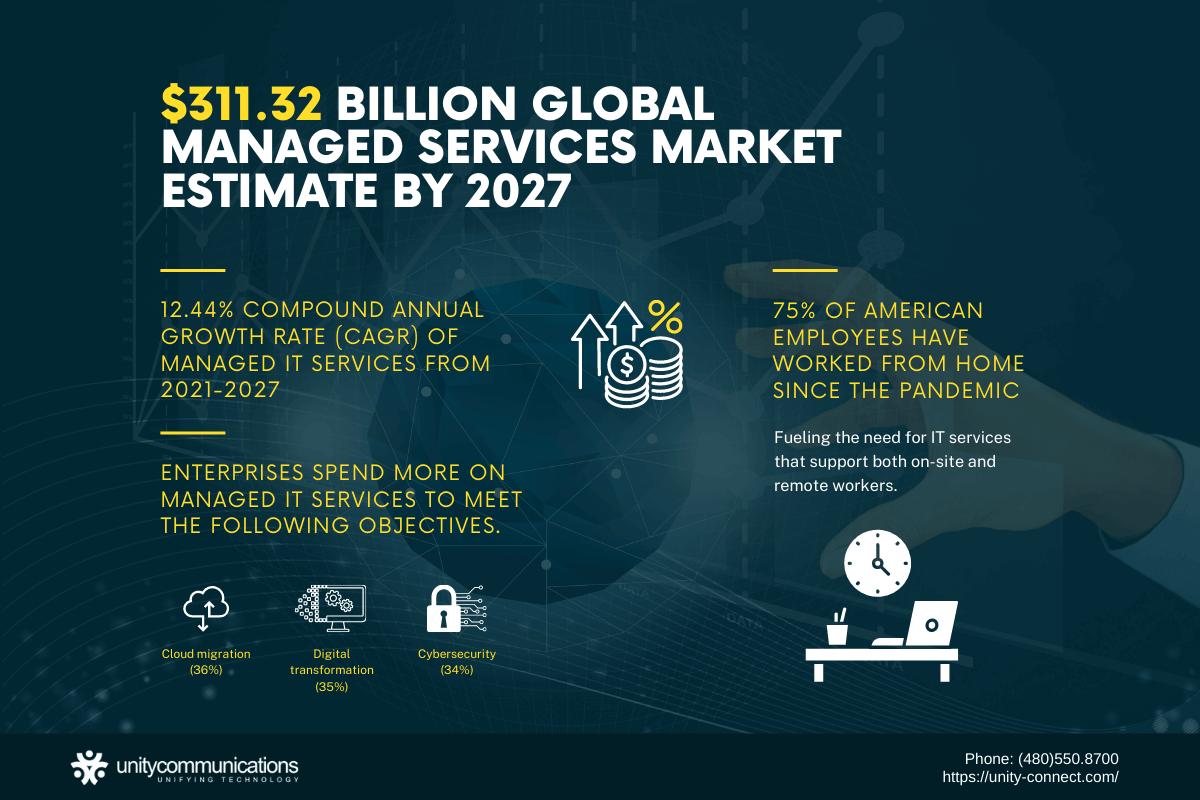
According to Grand View Research, the global managed IT services market size could reach $847 billion by 2033. Managed IT services have become an outsourced IT trend due to their cost-saving benefits.
Kaseya’s 2026 State of the MSP report found that enterprises are directing more of their IT budgets toward the following operational objectives:
- AI and automation (48%)
- Cybersecurity (71% of MSPs reported year-over-year revenue growth in this area)
- Business continuity and disaster recovery (50% reported revenue growth)
Still, companies should make a cost-efficient IT investment by outsourcing to a reliable MSP. This means working with a third-party vendor that can help you streamline your IT and save money.
Besides managed IT services pricing, consider the following:
- IT needs and requirements. Audit your IT infrastructure to identify operational needs and tasks that can be outsourced. Your overall cost for hiring an MSP depends on your IT requirements. You can set your outsourcing budget after the audit.
- Co-managed or fully managed services. You can delegate IT processes or entrust the entire operation to an MSP, which is more expensive. Choose a service package that is cost-efficient for your business.
- Service location. An MSP remotely maintains IT systems and manages IT processes. It can handle multiple business sites for global enterprises, although outsourcing for multiple business locations can cost you more.
- Remote or on-site employees. Robert Half’s 2026 benefits and perks survey revealed that 88% of employers provide hybrid work options, depending on seniority and individual circumstances. Having on-site or remote employees notably changes business IT needs. Typically, it is more expensive for an MSP to serve remote workers than to assist on-site employees.
- Number of devices. Review managed IT services pricing guides. Consider the monthly cost per device when hiring an MSP. The more devices used, the higher the cost.
- Number of users. Connecting more end users can result in a more expensive MSP bill. As mentioned, most MSPs charge clients between $51 and $100 per user.
- IT workforce. Consider the types of IT professionals you need. They might be IT support specialists, help desk agents, or desktop technicians. Your contracted MSP can charge you per IT-BPO agent.
- IT infrastructure and technology. The entire IT infrastructure influences the outsourcing cost. An MSP with modern facilities and tools often charges more. However, you will benefit from its quality-managed IT services.
- Pricing structures. Examine your IT operation and assess which functions to outsource. That will help you decide which model best fits your business.
- Service-level agreement. When companies outsource tech solutions, they create a service-level agreement (SLA). It details your operational objectives, key metrics, work scope, and the consequences of a breach. Negotiating with your MSP helps with deciding the overall outsourcing cost. The contract seals the deal.
You can optimize your IT operation by hiring managed services. But it doesn’t mean spending more to receive efficient service.
Unity Communications has a proven track record of IT support outsourcing services. We offer technical support, a dedicated help desk, and remote technical support. We are proud to have a team of technical experts leveraging the latest technology, including AI agents.
We extend affordable managed IT services to our clients without compromising quality. Contact us today to discuss your IT needs and requirements.
What are the hidden managed IT costs to watch out for?
A managed IT service provider can offer a predictable monthly or a fixed monthly fee. But it might not be the total service cost. For a small business, hidden charges can hurt the budget or drain the cash flow. Learn to look deeper into what is included in the service and what triggers additional fees.
Some hidden costs come from the structure of MSP pricing:
- Per-device pricing or per-user plans might seem simple. But they’re based on the number of people or mobile devices using the service. The more users and devices you add, the higher the cost.
- The beauty of per-user pricing is convenience. But scaling teams can quickly drive up expenses.
- Per-device costs also grow if your business uses multiple systems, including on-premises infrastructure and cloud platforms.
Another factor is the scope of service plans. Many managed IT services can offer network monitoring, backup, and cloud management. However, not all base packages include them. Some service providers offer low-entry pricing but charge extra for critical features. These include cybersecurity services, firewall management, or protection against cyberattacks. This is where understanding service pricing models and reviewing a full guide to managed IT services becomes essential.
Hidden costs can also come from support requirements:
- Basic packages might limit helpdesk access or exclude after-hours availability.
- Off-hours support and faster response times often come with added charges.
- Poor support can lead to downtime, reduced productivity, and a negative financial impact. All these affect your return on investment.
Be mindful of service-level commitments as well. A weak or unclear service-level agreement might not guarantee uptime or performance standards. A top-tier or best-managed services provider will define these clearly, but gaps in expectations can lead to unexpected costs.
Additionally, certain services are often billed separately:
- Professional services such as migrations or upgrades
- Advanced technology services
- Regulatory or compliance support
Finally, remember that pricing varies depending on company size and specific IT needs. What seems like predictable pricing might become more complex as your business grows. Understanding how charges are based makes the overall cost easier to manage.
How do you compare in-house vs. managed IT services pricing?
When evaluating IT costs and pricing models, businesses often ask, “How much do managed IT services cost compared to building an in-house team?”
Each approach has distinct cost structures. Understanding these differences can result in a sound financial decision.
An in-house IT setup typically involves fixed and variable expenses tied to staffing and infrastructure:
- Salaries for IT personnel, including system administrators, engineers, and support staff
- Employee benefits such as healthcare, training, and paid leave
- Hardware and software investments, plus ongoing upgrades
- Office space, utilities, and equipment maintenance
- Recruitment and turnover costs when hiring or replacing staff
These expenses can add up quickly. They can also vary depending on the level of expertise required. Highly skilled IT professionals command higher salaries, making it difficult for smaller businesses to maintain a full team without stretching the budget.
Meanwhile, outsourcing IT functions introduces a more flexible pricing structure. Many providers offer subscription-based options or flat fee arrangements. This makes budgeting more straightforward:
- Contract-based services that scale with business needs
- Access to advanced tools and systems without high upfront costs
- Reduced need for internal hiring and continuous training
- A proactive approach to system maintenance, helping prevent costly disruptions
While some providers advertise low pricing, it’s important to understand what’s included. Costs vary depending on the level of support, expertise, and coverage provided.
Overall, one advantage of outsourcing is that it drives managed efficiency. Companies can focus on their core operations while relying on a trusted managed partner for IT support. This can lead to better resource allocation and improved operational performance over time.
How do you evaluate ROI from a managed service provider (MSP)?
Evaluating return on investment (ROI) from a managed service provider requires looking beyond upfront costs and focusing on measurable business outcomes. The goal is to determine whether the partnership improves efficiency, reduces risk, and supports long-term growth.
Start by assessing cost savings compared to maintaining an internal IT team. Consider reductions in hiring, training, infrastructure, and system maintenance expenses. While outsourcing involves recurring fees, it often eliminates large capital expenditures and unexpected repair costs.
Next, examine operational efficiency. A reliable provider helps streamline workflows, automate routine tasks, and minimize disruptions. Improved system performance and faster issue resolution contribute to smoother day-to-day operations. Over time, these gains can increase employee output and improve resource use.
Downtime reduction is another factor. Frequent outages or slow systems can decrease revenue and customer satisfaction. By ensuring system stability and continuous monitoring, a service provider helps maintain business continuity.
Security improvements also help improve return. Cyber threats evolve, and preventing breaches is far less costly than recovering from them. A strong IT partner strengthens your defenses. It helps reduce the likelihood of data loss, legal issues, and reputational damage.